
Introduction
In this article, we explain how to perform an analysis in our system. You’ll learn how to analyze data and present the results in the form of reports and dashboards. This guide is intended for users who want to conduct a detailed analysis of model and project data.
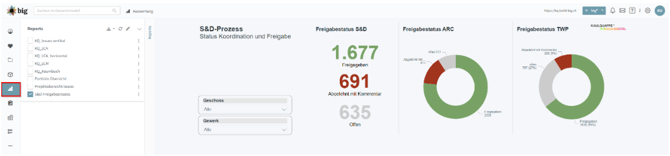
Analyzing Data
To perform an analysis, you must first select the correct data sources. Ensure that the data is complete and accurate to obtain precise analysis results. The following steps are required:
-
Identify the relevant data sources, such as models, work tasks, or documentation.
-
Define which metrics you want to analyze (e.g., costs, progress, deadlines).
Performing Data Analysis
Once you have selected the data, you can begin the analysis. This can take the form of KPIs, charts, or other statistical analyses. Use the analysis features in our system for this purpose:
-
Create KPIs: Identify key performance indicators to measure the project’s progress.
-
Charts and visualizations: Create charts such as bar charts, pie charts, or line charts to identify patterns in the data.
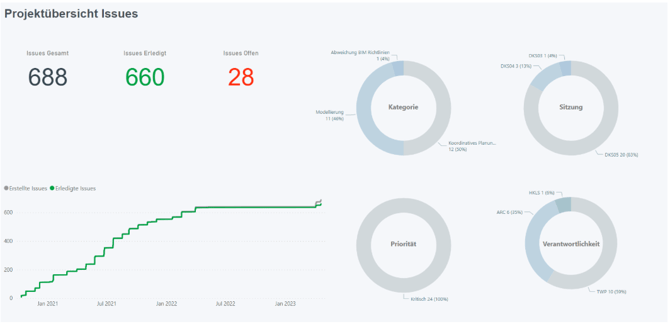
Creating and Exporting Reports
The analysis results can be summarized in a clear report and exported for further use:
-
Create a report: Combine the data and visualizations you’ve gathered into a report.
-
Export a report: Export the report to various formats, such as PDF or Excel.
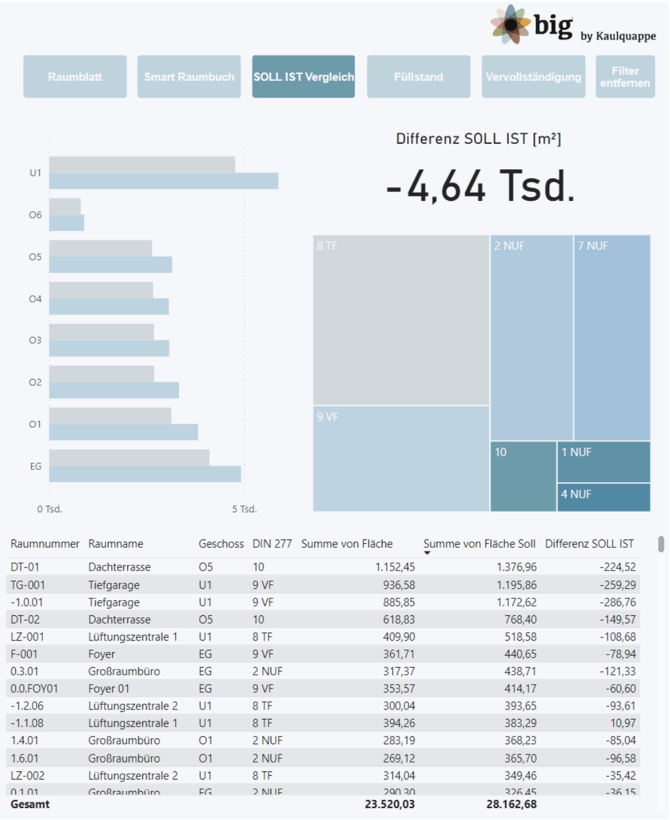
Dashboards and Real-Time Data
If you need to continuously analyze data, you can set up dashboards that update in real time. This way, you always have a clear view of the current status of your analyses.
Best Practices
Here are some best practices to keep in mind when analyzing data:
-
Life Cycle Assessment (LCA) Analysis
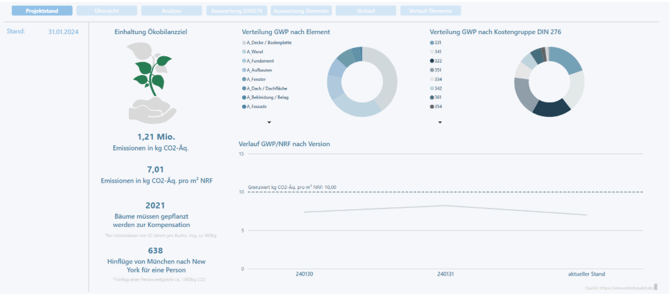
-
Use a variety of visualizations to present the analysis results in a clear and understandable way.
-
Create reports on a regular basis to monitor progress.
Conclusion
Analyzing project data is crucial for monitoring progress and making informed decisions. With the right analysis tools, you can gain valuable insights and increase your project’s efficiency.
If you have any further questions or issues, please contact our support team: support@build-big.ch